


Expense Tracker - MonAi
4.69.00 Reviews
App Specs
- Version
- 1.7.0
- Updated On
- License
- Free
- Downloads
- 10,000+
- Developer
- Florian Vates
- Categories
- Finance
- Platform
- Android
Screenshots


 Analysis by AppCompare
If you're anything like me, managing expenses can feel like juggling flaming torches while riding a unicycle. It's chaotic and sometimes downright scary. But I recently stumbled upon an app that feels like having a personal finance assistant in your pocket. Let me introduce you to Expense Tracker - MonAi.
Where MonAi fits into a daily routine
I find a spending tracker most useful when I can check it briefly at the moment a decision matters, rather than trying to reconstruct a whole month from memory. With MonAi, the practical habit is to review a purchase, record or categorize it, and then look back at the pattern when deciding what to spend next. That makes it a better fit for someone who wants regular awareness than for someone who only wants a once-a-month statement.
A realistic example is a week with a grocery run, a couple of meals out, and a bill that arrives earlier than expected. Looking at those expenses by category can help me notice that the small meals out, not the large grocery trip, are putting pressure on the budget. The useful next step is specific: decide on a limit for that category before the next week begins, rather than simply telling myself to “spend less.”
That kind of review also keeps the app’s AI advice in perspective. I would treat its suggestions as prompts to inspect my habits, not as instructions to follow automatically. A recommendation is only useful if it matches my actual priorities: cutting a recurring convenience expense may be sensible, while reducing a necessary bill may not be realistic. My own judgement still has to lead, especially when a spending pattern reflects a one-off event rather than a habit.
How it compares with familiar budgeting methods
Compared with a spreadsheet, MonAi is intended to make day-to-day tracking feel less like bookkeeping. A spreadsheet gives careful users greater control over the structure and calculations, but it also asks them to maintain that structure themselves. MonAi’s categories, reports, and AI assistance offer a more guided route for people who would rather spend their attention on interpreting spending than building a system from scratch.
It is also different from simply checking a bank balance. A balance tells me how much is available at a glance, but it does not necessarily explain which habits are changing or how spending is distributed. A dedicated tracker can make those patterns easier to review. On the other hand, anyone who already uses a bank’s own budgeting tools and finds them clear may not gain enough from adding a separate app to justify another routine.
One trade-off worth considering is that automatic account syncing can save time, but it makes the experience depend on whether the connected accounts and transactions are handled as expected. If I want a record I can inspect line by line and maintain independently, manual tracking or a spreadsheet may feel more reassuring. If avoiding repeated entry is the priority, syncing is the more convenient approach. Either way, I would check the categories and totals rather than assuming every transaction tells the full story on its own.
Worth Reading Before You Choose

Flipboard Shows What News Apps Must Do Beyond the Feed

Switching to Android Auto Means Rethinking Your Driving Routine

Google Calendar Makes a Crowded Week Easier to Manage

Ludo King Makes the Most of the Minutes Between Plans

Baby Panda World Brings Quick Play to Modern Phones, but Its Game Library Feels Busy

ESPN’s Live Game View Makes Following Close Games Easier
Making reports useful rather than overwhelming
Reports are most valuable when I use them to answer a single practical question. For example: did my food spending rise because of one unusual week, or because I have been eating out more often? Reviewing the relevant category over time is more actionable than scanning every chart without a goal. I would also compare the pattern with my own calendar, since travel, celebrations, or an unexpected household need can make one period look unlike a normal month.
A simple workflow is to check recent entries first, correct a category if it does not reflect the purchase, and then review the report. That order matters: a category-based summary is only as helpful as the entries behind it. It is a small maintenance step, but it can prevent a misleading conclusion, such as treating a one-time purchase as evidence that an everyday budget is consistently too high.
Budgets work best as guardrails, not as a scorecard. I would set a limit for a category where I genuinely want to change a habit, then revisit it after enough ordinary spending has accumulated to make the comparison meaningful. Setting a tight target immediately can turn normal variation into a string of apparent failures. The app can help make a budget visible; choosing a realistic number is still the user’s job.
Who is likely to appreciate it
MonAi is a natural option for people who want to see their income and spending together, prefer categorized summaries to a plain balance, and are willing to check their finances regularly. It may be particularly useful if you tend to forget small purchases and want a clearer sense of where they add up. The AI element may also appeal to someone who likes receiving suggestions as a starting point for reflection rather than building every budgeting rule alone.
I would be more cautious if you want a full accounting system, need to manage complex household or business finances, or require complete control over how records are organized. A specialist budgeting or accounting tool may suit those needs better. Likewise, if entering or reviewing expenses sounds like a chore you will avoid, even a well-presented tracker cannot create a consistent habit for you. The best choice is the one whose routine you will actually keep.
Privacy-minded users should make their own comfort with linking financial accounts part of the decision. Syncing can reduce manual work, but convenience and control are different priorities. If you prefer not to connect accounts, consider whether the way you intend to use MonAi still fits your habits. Either approach calls for a quick review of entries; automation can reduce effort, but it does not remove the need to understand your own records.
Getting Started with MonAi
First things first, downloading Expense Tracker - MonAi is a breeze. It's available on both Android and iOS, so no one’s left out. Setting it up is as easy as pie. Once you open the app, you're greeted by a clean, intuitive interface that even my grandma could navigate without breaking a sweat.
After a quick sign-up, you can start adding your income and expenses. The app allows you to categorize your spending into neat little sections like groceries, entertainment, and bills. This is incredibly helpful when you're trying to figure out where all your money is mysteriously disappearing to.
Features That Make Life Easier
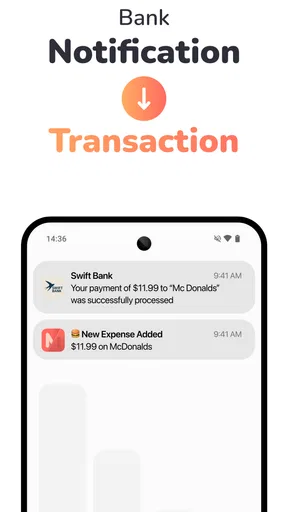
One of the standout features of MonAi is its ability to sync with your bank accounts. It saves you the hassle of manually entering every transaction. This real-time synchronization means you can get a clear picture of your financial health with just a few taps.
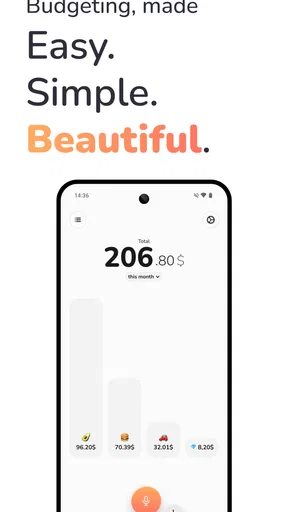
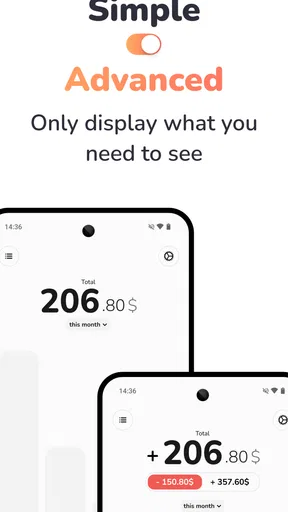
The app also offers detailed reports and analytics. You can see trends, track your spending habits over time, and even set budgets for different categories. It's like having a crystal ball but for your wallet.
Another cool feature is the integrated AI assistant. It offers personalized tips on how to save money based on your spending patterns. It's like having a financial guru whispering sage advice in your ear.
Design and Usability
I can't stress enough how important a good design is for an app like this. MonAi nails it. The color scheme is soothing, and the layout is intuitive. Navigating through the app feels natural, and I didn't encounter any hiccups or crashes during my time with it.
There's also a nifty widget you can place on your home screen, giving you quick access to your daily spending summary. It’s a small touch, but it makes a big difference.
Security and Privacy
With all your financial data in one place, security is paramount. MonAi uses robust encryption to keep your information safe. Plus, there's a handy pin code or biometric login option, so you can rest easy knowing your data is secure.
The app also respects your privacy. It doesn’t sell your data to third parties, which is a huge relief in this digital age where privacy often feels like a luxury.
Speed, stability, and device fit
For a finance app, perceived speed is less about flashy transitions and more about whether checking a purchase feels quick enough to become routine. MonAi’s straightforward layout and home-screen widget make that kind of short check convenient. I would still judge the experience by how it behaves on my own phone and with my own account setup; syncing can involve factors beyond the app itself, so I would not assume every refresh will feel identical.
There is a useful distinction between occasional use and heavy use. If I only check the daily summary and review a few categories, the app’s core workflow should remain simple. A more demanding routine—frequent account checks, detailed report reviews, and regular budget adjustments—makes organization more important. In that case, I would settle on a small set of categories and a regular review time rather than repeatedly opening the app without a question in mind.
Stability matters because missing confidence in a finance tracker quickly undermines the habit. My experience with the interface was smooth, without crashes or hiccups, but that is not a guarantee that every device, account connection, or future session will behave the same way. If something appears out of date, I would first check the relevant transaction and account view again before making a budget decision based on it. Keeping a separate record of an important payment until it appears as expected is a sensible precaution for anyone who relies on timely tracking.
MonAi is a free finance app from developer Florian Vates, with optional in-app purchases priced from $1.99 to $24.99 per item. It is rated for Everyone, has an average rating of 4.6 from 782 ratings, and has reached over 10,000 installs. Version 1.7.0 is the current version, and it requires Android 10 or later. Those details make it approachable for many users, though device compatibility and the optional purchase choices are worth checking against your own needs before settling into it.
I would not expect a tracker to replace careful financial decisions, and I would not choose it solely because it includes AI. Its value is in making regular review easier: keeping categories visible, showing patterns, and giving me a prompt to think about a habit. If I need sophisticated planning or prefer a completely self-managed record, a spreadsheet or more specialized tool may be a better match. If I want a guided everyday overview, MonAi’s approach is more appealing.
Final Thoughts
Overall, Expense Tracker - MonAi is a fantastic tool for anyone looking to take control of their finances. It's user-friendly, packed with useful features, and prioritizes your security. Whether you're a finance newbie or a budgeting pro, MonAi can help you keep your financial house in order.
So, if you're tired of those end-of-month surprises when you check your bank balance, give MonAi a try. You might just find it's the trusty sidekick you never knew you needed.
Pros
- User-friendly interface makes tracking easy.
- Supports multiple currencies and accounts.
- Customizable spending categories.
- Real-time expense notifications.
- Data export options for reports.
Cons
- Limited features in free version.
- Ads can be intrusive at times.
- No direct bank integration.
- Occasional syncing issues reported.
- Requires internet for full functionality.
FAQs for Expense Tracker - MonAi
What is Expense Tracker - MonAi and how does it work?
Expense Tracker - MonAi is a personal finance application designed to help users manage their expenses and budget effectively. It allows you to input your daily transactions, categorize them, and generate financial reports. The app uses AI to provide insights into spending habits, helping users make informed financial decisions.
Is Expense Tracker - MonAi secure for managing my financial data?
Yes, Expense Tracker - MonAi prioritizes user security. It employs encryption protocols to protect your financial data and personal information. The app requires secure authentication methods, ensuring that only you can access your financial information. Regular updates also ensure that security measures are up-to-date.
Does Expense Tracker - MonAi support multiple currencies?
Yes, Expense Tracker - MonAi supports multiple currencies, making it suitable for users around the world. You can easily switch between currencies for different transactions, and the app will automatically convert amounts based on real-time exchange rates, providing accurate financial tracking regardless of your location.
Can I sync Expense Tracker - MonAi with my bank accounts?
Expense Tracker - MonAi offers the ability to sync with various bank accounts, allowing real-time tracking of expenses directly from your bank. This feature simplifies financial management by automatically categorizing transactions, reducing manual entry, and providing a comprehensive view of your financial status.
Is there a free version of Expense Tracker - MonAi available?
Yes, Expense Tracker - MonAi offers a free version with basic features suitable for general expense tracking. For advanced features like AI-driven insights, detailed reports, and unlimited account syncs, there is a premium version available through a subscription model. This allows users to choose a plan that best suits their financial management needs.


